AWS Data Transfer Pricing Between Availability Zones

AWS Data Transfer Pricing Between Availability Zones

AWS Data Transfer Pricing Between Availability Zones

The below listed AWS services include some service-specific pricing related to cross Availability Zones data transfer:

Amazon Elastic Load Balancing:

Data which is being transferred between the following: EC2 instances and Amazon Classic and Application load balancers, with the use of private IPv4 addresses included in the exact same shared region is considered as free of charge.

Amazon RDS + Amazon Neptune:

  1. Data which gets transferred between differing availability zones for the sake of replication of Multi-AZ deployments is considered as free of charge.
  2. Regarding data which is being transferred between RDS or Neptune instance outside VPC and EC2 instance inside VPC, you are merely going to be charged for the data which gets transferred into or outside of EC2 instance only.

Amazon Aurora:

AWS Data Transfer Pricing Between Availability Zones - amazon aruora

AWS Data Transfer Pricing Between Availability Zones – amazon aruora

Data being transferred between differing availability zones for the sake of replication of Multi-AZ deployments is considered as free of charge.

Amazon ElastiCache + Amazon Cloudsearch:

Regarding the data which gets transfer between Cloudsearch or ElastiCache nodes, and EC2 instances found in the exact same region, you will merely be charged for data which is transferred into and outside of the EC2 instances.

Amazon Elasticsearch:

Data which gets transferred between nodes located in the exactly same domain is considered as free of charge.

Amazon MSK:

AWS Data Transfer Pricing Between Availability Zones - amazon MSK

AWS Data Transfer Pricing Between Availability Zones – amazon MSK

Data which is being transferred between brokers or Apache Zookeepers and brokers is considered as free of charge.


Keep in Mind

The costs of data transfer found and summarized in this document hold an explanation about the way that AWS services and AWS resources are going to charge you for your data transfers which also involve them.

In case an AWS service tends to use other AWS services or AWS resources, then in this case you are definitely going to incur extra added charges for your data transfer costs related to the other taken AWS services and resources.

For Example: In case you choose to configure your S3 bucket for having event notifications to an SQS queue and a Lambda function, then in this case you are going to incur some SQS and Lambda data transfer charges and costs.

For Example: There will not be any data transfer charge for the utilization of AWS Elastic Beanstalk. You will be paying for the data transfer costs related to the additional AWS resources that you later create for the sake of storing and running your chosen application.

Every single data which gets transferred because of the following reasons:

– Failed or timed out requests

– Responses to requests

– File or network traffic overhead

This transfer being made will be counted towards your data transfer usage and charges.

Some of those data transfer examples include:

(1) Any failed or timed out S3 object upload will be incurring some data transfer costs.

(2) Any response to SQS SendMessage API calls will be incurring specific data transfer costs, as well as the TCP re-transmits made at the network communication layer.

All data transfer costs related to the AWS services and resources might be added to the standard processing or routing charges for the data being transferred to them.

For example: In case you have in your possession an EC2 instance being routed to the Internet across a NAT gateway, then in this case you are going to incur region-specific data transfer charge for every single data being transferred through NAT gateway added to the region-specific NAT gateway data processing charge as well.


  • You will not be charged at all for any Data Transfer occurring between EC2 and different Web Services located in the exact same region. For example: No charge for data transfers between EC2 US West region and S3 in US West region.
  • Data which gets transferred between EC2 instances that are found in differing AZs, while remaining in similar Regions, are going to get charged with the Regional Data Transfer.
  • Transferring Data between services, that are found in differing regions, is going to get charged as an Internet Data Transfer on both the destination and source sides.

    Any other usage made from different Amazon Web Services is going to be charged for as a separate bill than that of EC2.

Data Transfer through Availability Zone: $0.00 per GB

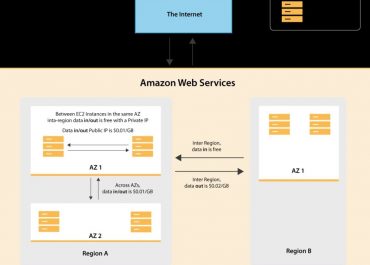
All the data which is being transferred between EC2 instances that are found in the exactly same AZ through the utilization of a private IP address.

Data Transfer through Public & Elastic IP + Elastic Load Balancing: $0.01 per GB in or out

In the case that you decide to go for communication through utilizing a Public/Elastic IP address, otherwise an Elastic Load Balancer located within the EC2 network, you are going to have to pay your Regional Data Transfer rates, regardless of whether both those instances are found within the same AZ or not.

Data being transferred within an exactly same AZ, it’s possible for you to simply and quickly prevent getting charged for this fee, while ensuring yourself some more efficient network performance, all through the utilization of a private IP anytime it can be done.

Data Transfer through Regions: $0.01 per GB

All the data which is being transferred between EC2 instances that are located in differing AZs while remaining in the exact same AWS region.

aws ec2 data transfer pricing

AWS Inbound Data Transfer Pricing

AWS Inbound Data Transfer Pricing

AWS Inbound Data Transfer Pricing


AWS Data Transfer Costs

It’s a simple task to concentrate on instance costs while wanting to get used to your AWS spend, however data transfer may be an acknowledged cost center on its own. Here we will discuss the major details regarding AWS data transfer costs along with a couple of tips for lowering them.


Information about AWS Data Transfer Costs

Data is considered to be the greatest significance of assets for your company. When using the cloud, you get to enhance the mobility and flexibility of your data for the sake of improving its value. Using the cloud, it gets simpler to move your data to the exact place where you need it to be, at the time when it is most required. The only thing about it is the fact that the process of moving data is going to cost you some money, and AWS data transfer costs are capable of swiftly adding up. Now we will give you a better look at those costs and the way to handle them.

Meaning of AWS Data Transfer Costs?

They are what get charged by AWS for the sake of transferring data in two ways, either:

– Goes between AWS + the internet

– Goes within AWS, between services (EC2 or S3)

A couple of AWS services get their cost for moving data in or out is regarded as being the cost of the service itself, and not charged as a different data transfer fee. At times this would imply to the lack of a unique data transfer price in both directions, like what happens in AWS Kinesis. At times it would imply to having a unique price for moving data in specific way, and not another one, like trying to transfer to and from S3 over different regions. At different times, there might be a price for transferring data in as well as one to transferring data out, like transferring across EC2 instances in differing AZs.

Every one of those distinct variables imply that the act of having to control data transfer costs refers to having the knowledge about the way your data tends to move around.

Transferring Data Between AWS and the Internet

The price of transferring data from AWS to the internet depends greatly on the region. As an example, S3 buckets that are found in the US West (Oregon) region, get their first GB/month for free while the following 9.999 TB/month will cost $0.09 for every GB. Yet, S3 buckets found in South America (São Paolo) regions, get their first GB/month for free as well, and the following 9.999 TB/month will be costing $0.25 for every GB.

Transferring Data Within AWS

Within AWS, there are two ways for transferring data: across regions or within a region.

– The Transfer of Data Across Regions

The transfer of data between AWS services across regions includes the exact cost structure as that of the transfer of data going between AWS and the internet. Such costs will as well be dependent on which region chosen, but transferring data into an AWS region from a different region is for free. This means that you will merely be charged for outbound transfers of the region where the transfer starts from, and not the inbound transfer in the target region.

– The Transfer of Data Within Regions

Transferring data between AWS services within a region costs differently depending on whether you’re transferring data within or across AZs.

Within the same region, same availability zone and with a private IP address, data transfer is free. Being within the same region while in different availability zones, data transfer has a cost accordingly.

Check out this diagram to see the different types of data transfers for EC2 instances in US West (Oregon).

AWS Inbound Data Transfer Pricing - ec2 data transfer types

AWS Inbound Data Transfer Pricing – ec2 data transfer types

Tips for Saving Money:

– Planning Your Route

Read some information regarding data transfer costs:

  • They are the most expensive for data transfers happening between regions.
  • Second place in expensive costs come data transfers happening between availability zones within a region.
  • The least expensive costs are for transfers within a single availability zone.

You are capable of lowering data transfer costs through developing an infrastructure where your data will be flowing in a way that goes with the lowest costing routes. Lessen your traffic as much as possible across regions and availability zones. Reach the highest possible traffic which remains within an availability zone or a region.

Like what we said before, differing regions include differing data transfer costs. In case you don’t need to utilize a particular region, check out some of them for finding out which of them will be offering you the best of cost savings.

– Using Private IP Addresses

AWS Inbound Data Transfer Pricing - private IP addresses

AWS Inbound Data Transfer Pricing – private IP addresses

When being across the board, the costs of data transfer reach their highest value with either a public IP or Elastic IP address rather than having a private address. When stably being used, private IP addresses are capable of reducing costs greatly.

– Considering Amazon CloudFront

CloudFront is known for being a global CDN service. When data transfers happen from EC2 to CloudFront they don’t cost a thing. In case you intend on moving great volumes of data to users (audio, videos and images), then the use of CloudFront will aid you in holding back your data transfer costs. The price of transfers happening from CloudFront towards the internet is dependent upon the region + amount of data transferred. Check out a couple of options.

Regional Data Transfer Out going to Internet per GB

Per MonthUnited States & CanadaEuropeSouth Africa & Middle EastJapanAustraliaSingapore, South Korea, Taiwan, Hong Kong, & PhilippinesIndiaSouth America
 First 10TB0.0850.0850.110.1140.1140.140.170.25
 Next 40TB0.080.080.1050.0890.0980.1350.130.2
 Next 100TB0.060.060.090.0860.0940.120.110.18

– Experimenting with the Simple Monthly Calculator

This calculator allows you to discover different configurations to find out the way to save the highest amount of money. It can as well provide you with the ability to keep sight of the variables which may affect your costs. Choose which resource to utilize (EC2 or S3), select your wanted region, then check the Data Transfer section in the calculator for finding out which factors needed for consideration. If you plug in a couple of values for reaching a sense over your outcoming costs.

Data Transfer Costs

In this table you may check data transfer costs incurred for multiple AWS services. A black dot means that you may be charged for such a data transfer. It’s important to keep in mind that data transfer OUT refers to that which gets transferred from a chosen service to the internet, while data transfer IN refers to that which gets transferred to the internet from a chosen service.

ServiceData transfer inData transfer to different AZ in regionData transfer out to other regionsData transfer out to internetData transfer out to CloudFront
Amazon EC2 (Includes EBS)
Amazon EKS (Based off EC2 clusters)
Amazon S3
Amazon CloudFront
Amazon RDS
Amazon DynamoDB
Amazon Aurora
Amazon Glacier
AWS Snowball
Amazon CloudSearch
Amazon SNS
Amazon SQS

Information regarding EC2 and S3:

They are thought to be the most popularly used services for AWS. Therefore, it’s great to know a bit more about their costs.

What’s free in EC2?

No cost is accompanied with data transfers done within the same region, that are out of EC2 to:

– S3

– Glacier

– DynamoDB

– SES

– SQS

– SimpleDB

No cost is accompanied with data transfer found within the same availability zone, transferred to:

– RDS

– Redshift

– ElastiCache instances

– Elastic Load Balancing

– Elastic Network Interfaces

Without taking the region or availability zone into consideration, there won’t be any data transfer cost for data being transferred to CloudFront or while utilizing a private IP address. Every single data transfer IN to EC2 from the internet is completely free of charge.

What’s free and what’s not in S3?

s3 Cost Calculator

EC2 data transfer pricing

data transfer pricing calculator

EC2 cost calculator

Lambda Cost Calculator

EC2 Data Transfer Pricing

AWS EC2 Data Transfer Pricing

Amazon EC2 Data Transfer Pricing

Incoming EC2 Data Transfer Costs

EC2 instances have different incoming data transfer costs than that of outgoing data transfer costs. Now, go ahead and check out the pricing information regarding incoming Data Transfer costs for EC2:

Its free of costs, excluding:

  • The use of an Elastic or Public IP address, costs 1 cent per GB
  • Redshift, EC2, RDS and ElastiCache instances or Elastic Network Interfaces found in a different AZ or a peered VPC located in the same Region, cost 1 cent per GB

For the sake of understanding the previously mention pricing information in a more intensive way, you will have to get to learn the usage scenarios where incoming data transfers occur with EC2 instances.

– Incoming data transfer may occur at the time when developers try to upload code and more software modules to their application server. In very rare cases does this type of data transfer’s volume tends to cross volumes in multiples of GBs. Even when this happens, in case your EC2 instance was utilizing an Elastic or Public IP address, its cost is going to reach a maximum of 1 cent per every GB only.

– A different usage scenario where this happens is simply when end users of this app tend to upload some high-volume data like that of an image, video and audio files to their app server. In the case that such a use case is not found in the app, you are going to have to get worried about incurring any incoming data transfer charge at all.


Outgoing EC2 Data Transfer Costs


Check out some of the billing information regarding outgoing data transfer pricing for your EC2 instances.

It is going to be feed out of EC2 for:

  • The use of an Elastic or public IP address, costs 1 cent per each GB
  • RDS, EC2, Redshift or ElastiCache instances, Elastic Load Balancing
  • Elastic Network Interfaces found in a different AZ or peered VPC located in the same Region, cost 1 cent per every GB
  • A different Region, costs 2 cents per GB

You are going to have to acknowledge the previously mentioned information through looking at some usage scenarios for the sake of evaluating your cost implications.

– Mainly, your previously stated costs above may merely get incurred at the time that your data transfer takes place through the use of web services happening between 2 Elastic and Public IP addresses.

Also, in such use cases, the cost will merely be reaching about a price of 1 cent per each GB.

– Another different use case is when the data which is stored in your EC2 instance need to get directly moved to some specialized storage service such as that of Amazon RDS.

– An even third use case is that of the Disaster Recovery app where data gets moved between storage services that are located in differing regions.


Optimizing Costs through CloudFront

EC2 Data Transfer Pricing - optimizing cost through CloudFront

EC2 Data Transfer Pricing – optimizing cost through CloudFront

Your data transfer cost is going to be free for a lot of the most common usage scenarios when you choose to transfer data between storage located in the exact same zones.

No data transfer cost is going to be incurred upon the transfer of data out of EC2 to the following services:

  • S3, SES, Glacier, SimpleDB, DynamoDB, or SQS found in the same Region
  • EC2, Redshift, RDS, ElastiCache instances, Elastic Load Balancing or Elastic Network Interfaces that are located in the exact same AZ
  • The use of a private IP address
  • CloudFront

After carefully observing the previously mentioned billing information, it can be clearly noticed that there will be zero cost for transferring data from EC2 to CloudFront. What we may imply from this is that in case we tend to leverage CloudFront to server video, images and audio files to your end-users, we are going to be capable of keeping our data transfer costs maintained at a greatly optimal level.


Data Transfer Intensive Applications Cost Optimization

EC2 Data Transfer Pricing - intensive applications cost optimization

EC2 Data Transfer Pricing – intensive applications cost optimization

The Developers and Administrators of Web Apps that are considered data intensive like the following:

– Websites which include thousands and millions of users

– Apps which utilize audio-video files in heavy volumes

Big Data apps require taking adequate control in data transfer for the sake of avoiding any surprise thorns in your billing information.

Data Transfer costs for the unique purpose data storage services shall charge some costs that are particular to which storage type utilized. Nonetheless, it will still be free in case the data transfer occurs between instances that are located in the exact same AZ.

It is considered highly important to get to acknowledge the time when your data transfer costs become applicable for your usage of EC2 instances. Even though there exist a lot of sources for your billing information regarding costs of data transfer, you are still required to place this information within the occurrence of real usage scenarios for the sake of acquiring a better understanding of what costs will be incurred.

s3 data transfer cost

ec2 pricing calculator

AWS Billing Reports Are Unpredictable

AWS Billing Reports Are Unpredictable

AWS cloud optimization methodology revolves around PERFORMANCE, AVAILABILITY, and PRICE.

Price is one of the key variables of AWS cloud optimization. You need nearly real-time visibility of overall costs for data and services usage. To get the most of AWS services and its components, it’s essential to keep an eye on the money you’re spending on your project. Losing your grip on your budget means losing your opportunity to deliver fast and reliable applications to your customers and you might end up spending a lot more than expected.

You might find a way to develop the best website, but if you ignore how much you need to pay for it, your project viability is at risk.

Amazon Web Services (AWS) instance cost management is the most common challenge people encounter when they migrate to the cloud. Unfortunately, there is no standardized, effective  solution to avoid overspending on instances. Cost management of AWS services requires vigilance and a commitment to continual review.

Calculate your bills

Migrating to AWS can burn a hole in your pocket. To avoid your hefty bills, it’s really important to get an estimate of the overall cost you might need to spend to deploy your project.

For this, you can use the AWS Simple Monthly Calculator to calculate the overall cost of the whole project.

This can be time-consuming and you might need to do manual work to calculate the price of your project. You can avoid all the manual work and monitor AWS usage charges by setting up CloudWatch Billing Alerts. The AWS CloudWatch will alert you about your overspending – if charges exceed a specified threshold. You can also opt for AWS Billing Reports. These reports can be delivered to an S3 bucket of your choice and you can analyze them or make them available for external tools to analyze.

Issues with AWS billing reports

The common issue with AWS billing reports is AWS don’t provide real-time reporting of the costs. The billing metrics are updated once in six hours. Moreover, the AWS cost and usage  reports are uncertain. The AWS cost and usage  reports update as infrequently as once per day. So if you’re running performance tests or monitoring an infrastructure update, you obviously want to see price metrics as soon as possible or before the usage becomes a pricing issue. Waiting a full day – when the charges have already incurred is a major issue.

Moreover, your billing reports show how much you have already spent but not how much will you spend given on the current configurations. So whenever you are introducing a new service or a new customer on your cloud stack, you are clueless about how much the new configuration will cost you.

Related article:

AWS Cost Optimization

The Solution to Cloud Billing Issues

For real-time cost optimization, you can use AWS Cloud Management tools such as AWS cost calculators – EC2 Cost calculator, S3 Cost Calculator, Lambda Cost Calculator, and Data Transfer Cost Calculator to analyze your exact workload costs, charge-backs, resource utilization, and more. The easy-to-use AWS cost management tool offers simple solutions for deciphering even the most complex invoice as well as services you’re using and how you’re using them. You get a clear, user-friendly invoice report of the servers and services you’re using for the growth of your business or organization.

The best thing about these tools is that calculations are based on nearly real-time. You can choose a system that helps you monitor the recent and past data usage of the cloud services and also calculates exact spending at any given time, depending on real-time dynamics. However, each calculator isn’t created equally so choose the one that meets your business requirements, otherwise, you’ll end up with an additional expensive solution that will make your cloud journey more complex. You also need to ensure to choose the cost management tool that is adaptive to the cloud workload dynamics. This means if you change the workload resource consumption after the last deployment, you should be able to track the new behavior and forecasts will be generated based on the changed behavior.

Want to know more about AWS cost management tools, stay tuned to our blog!

aws cloud cost models

Cloud Computing Architecture

Cloud Computing Architecture

Cloud technology offers mutual benefits to both enterprise business units and IT. While for businesses, it offers a lower cost of business operations through operational excellence and also saves costs for the IT by balancing the cost through scale and higher utilization.

Traditional on-premise technology architecture is no longer able to meet the highly demanding functionality requirements, operating costs, and innovation. Cloud technology is a system that provides lowered total cost of ownership, rapid deployments, increased agility, and reduce capital and operating costs. Several cloud architectural models offer their unique features based on the business requirement.

The ultimate aim of the cloud model is to design a system that allows users to have uninterrupted access to their data and applications and also which provides the users with high bandwidth for fast computations. Each component has its own operating and maintenance costs involved.

The model of pay-as-you-go will only work when businesses understand the costs involved in the existing systems and go for the right type of cloud architecture design. The major cloud design offerings are:

1.  Software as a Service (SaaS)

This involves the distribution of software (hosted and maintained on the internet) that customers are licensed and use for their products. This minimizes the cost involved for hardware requirements since all software is hosted remotely. It further reduces IT cost by outsourcing hardware and software maintenance. Another cost-consuming task is to install, maintain and update the software. The SaaS model removes this burden from the enterprise businesses, thus offering overall reduced operating costs.

2.  Platform as a Service (PaaS)

This provides a platform for the programming developers to create software that can be delivered over the web. It is a computer platform specifically used for software development organizations. This provides the facility with quick and easy-to-use web applications, even for non-programmers. While it offers lower cost and ease to use by providing pre-defined business functionalities, it also could become complex and vendor migration and data privacy in this could majorly impact the budget.

3.  Infrastructure as a Service (IaaS)

This majorly is focused on reducing the cost involved by IT on infrastructure and hardware such as virtual machines, servers, storage drives, operating systems, and networks. These are also available on pay per usage basis. Major organizations invest huge amounts in buying and configuring their on-premise systems first before developing a new product. IaaS provides these resources fully outsourced, which becomes much more cost-efficient as compared to the traditional way.

Once the business achieves the first prerequisite, ensure that they understand cloud design principles and know the characteristics of each architecture and requirements of the applications they plan to migrate. The next step focuses on Engineering and IT to work together to identify the needs and evaluate the costs for cloud management.

Every service provider has a way to bill for the services. The business must first understand the billing criteria and then decide to choose the cloud vendor. Some charge based on GB per hour, while some on Cost per click or cost per rack unit. Majorly, there are two ways in which we map the costs with the systems – Evaluate Direct Infrastructure Costs and Indirect Costs.

Direct Infrastructure Costs

Based on the cloud design, the direct costs include the cost involved for software licenses, yearly or monthly subscriptions, and maintenance contracts, etc. Along with this, the amount of storage allocated and utilized, network bandwidth costs, and the database technology and its capacity to consume the data from the servers are included as indirect costs. The estimation of cloud infrastructure and operating costs also include any training costs, IT staffing, skill upgrading, and resources required to manage the cloud services in the business.

Indirect Costs

These are often called hidden costs. Organizations end up doing over-engineering to identify and avoid these costs. These are majorly situational-based or are part of the mitigation strategy of the business. They are always in a range based on several factors like

  • Loss of productivity and revenue when the IT infrastructure goes down.
  • Monitor utilization and rightsizing of the instances
  • The shutdown of the workloads during specific hours
  • Not active storage or services during the day
  • Automated solutions to switch or deal with temporary workloads.

Today, major organizations are struggling to create a balance between modern technology and the costs involved. The services and offerings of cloud technology are so tempting that we often end up setting high expectations than our actual needs.

While on the contrary, the teams which are proactive and smart try to break the architecture and costs at a much more granular level that they are left with another problem to solve i.e. Over-engineering. Our actual business requirements would define the need of which resources we need today or for the future and will help us choose the best type of cloud architecture.

Cost Reduction in Cloud Computing

Cost Reduction in Cloud Computing Can Be Overwhelming

Cost Reduction in Cloud Computing Best Practices

According to Gartner’s analysis, AWS accounts for 47.8% of the IaaS public cloud services market share in 2018.

Amazon Web Services (AWS) helps you move faster, give access to services including database, analytics, storage, applications, and deployment, etc. are lesser IT costs.

Customers have been attracted to AWS for a wide range of reasons, such as the ability to start small and grow as needed, its payment models such as ‘pay-as-you-go, on-demand, and reservation’, and increased collaboration between employees, and changes the workflow of small businesses and large enterprises to help them make better decisions while decreasing costs. This allows businesses to obtain the best return of their investment for each specific use case.

Big companies like Netflix, Alibaba, ESPN, and BBC, etc. are already AWS services. The significance of the cloud is rising every passing day.

Gartner forecasts that the cloud services market will grow 17.3% in 2019 ($206.2 billion) and by 2022, 90% of organizations will be using cloud services.

Changes in Prices Over Time

Amazon has lowered its cost of using platforms 67 times since its launch.

Over the last decade, the AWS model is reshaping across two dynamics – AWS sourcing and cost management. The competitive pressure and drop in revenue growth rate is causing AWS to demonstrate more flexibility at the negotiation table as well as to make changes to its enterprise pricing/discount and support programs.

Introducing new services and continuous change in prices of the services, and pricing schemes have made it difficult for customers to predict the cost of the overall process. The more rapidly the price changes, the more challenging it gets for customers to predict the cost. AWS might have been reducing its cost since the launch, this doesn’t mean you won’t end up paying less. No matter how many times they reduce their price, migrating to AWS may cost you a fortune.

AWS can cost more than customers’ expectation. The prices can go high for more hosting of technical infrastructure as well as business related reasons. The pricing model of AWS is complex. It might be difficult for you to understand your bills unless you’ve thorough understanding of every aspect relevant to the application and its deployment environment. So if you don’t have understanding of every operational facet, it’s not possible for you to manage your expenses.


The unexpected rise in prices have encouraged some customers to re-consider their options and migrate to another cloud providers who offer accountability, simplicity, pricing transparency, and governance.

Solution

Before migrating your business to AWS, create a business plan and understand how much your cloud migration should save or how much you expect it to add to your cost. You can also create an economic model to find out how much you will spend on AWS across applications, services, and projects. You can use the AWS calculator to know how much AWS services will cost you so that you can accurately plan your budget.

The next thing you can do is to keep an eye on your invoice. Look out for a sign or red flag that might help you improve your underlying cloud infrastructure. For example, excessive data transfer costs may be a sign that you might need to reduce the amount of data transferred between regions. You can calculate your ec2, lambda, data transfer or s3 cloud cost to have a baseline.

Monitoring the infrastructure changes is not enough, you need to monitor the change in prices too. As AWS offers a pay-as-you-go approach for payment, you can always change your requirements as per the reduction in price. With the help of the AWS calculator, you can have an idea that how much it can cost you. Moreover, look out for the deals and discounts that can you obtain over the internet.

AWS Cost Reduction

AWS Cloud 

cloud computing architecture

principles of FinOps