AWS Lambda Summary

AWS Lambda Summary

Serverless computing: 

Serverless computing is the utilization of pay-per-use services which give users the chance to run snippets of back-end code for various websites and applications without the expense of managing servers.

aws lambda

Importance: 

Its services help with the reduction of overhead and cost accompanied with managing any of physical or virtual infrastructures.

Who is affected by serverless computing?

 It affects mainly businesses and companies that are running websites and applications and require back-end services or analytics.

How far serverless computing has gone?

Serverless computing is on the go and happening right now where every one of the major cloud computing platform providers allow for the use of serverless computing services.

How to get into a serverless computing?

You can have Serverless computing by using any cloud platform you choose. It is available on Microsoft Azure, CloudFlare Workers, AWS, IBM Cloud Functions and Google Cloud Platform.

What does serverless computing mean?

What does serverless computing mean

What does serverless computing mean

It is a part of cloud computing services which focuses on two of the main selling points found in the as-a-service model, providing computing that is almost completely hands-off and where you only get to pay for the consumption that you utilize and nothing else.

In this service, there are no virtual infrastructures needed for the user’s management. The users are only charged depending on the duration when the code is functioning, until the nearest one hundred milliseconds.

All of the scaling, fault tolerance and redundancy of the infrastructure is being managed fully. There are servers involved, but the user shouldn’t worry about keeping an eye on them because everything is maintained by the cloud service provider.

Lambda and the rest of the AWS serverless computing services, are developed for running snippets of code that only take on a single short-lived task.

Those functions do not depend upon any other code and can therefore be deployed and executed anywhere and at any time they are needed.

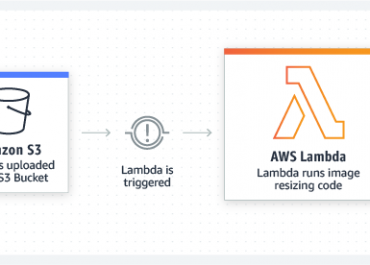
One example of a Lambda function could be the code which works to apply a filter to each picture uploaded from a random website to Amazon’s S3 storage service.

The code which is running on serverless services is far more typical of that which can be found in a microservices software architecture, unlike cloud applications where the backend code is seemingly found in a more monolithic fashion and may handle a number of different tasks. Using such a model, applications get to be broken down into their core functions, which are intended to be run alone and communicate using API.

Functions being run by serverless services are triggered first by “events”. Lambda for example is triggered by an event source such as a user uploading a file to S3 or a video sent to AWS Kinesis stream for example. Lambda function runs when such events get fired. As soon as a function has run, the cloud service spins down the inner infrastructure. Such a method will result in users only getting charged for the duration of code working.

Lambda’s name comes from the original mathematical term Lambda function, which implies to the small anonymous functions that are used in Lambda calculus.

aws lambda pricing model

AWS S3 Pricing Model

How AWS S3 Pricing Model Works?

S3 Pricing: Most Cost relies on “Storage” and “Transfer”

SizeCostStorageTransfersRequests
Low0.1510GB1GB5300
Medium2.87100GB10GB53000
High39.631TB100GB5030000
  • Low Usage Example

Basic storage configuration, where cost to store on S3 is minimal.

To store around 10GB of data or less without downloading, S3 will be of benefit and only charge pennies per month.

Even with 5,300 requests, four times that amount should be performed before even spending a dollar on web requests.

  • Medium Usage Example

Average or medium-sized storage configuration.

S3 pricing is monthly, so it’s about 30 days to perform 50,000 object GET Requests for about 1,667 a day.

100GB of storage and 10GB of data transfers are large quantities for hosting images, text or audio.

You shall only face a problem when using S3 to serve up static content for your famous website.

  • High Usage Example

Even with extreme storage requirements cost is not a problem.

High storage volume shows that a terabyte of data can be stored, and 100GB of data transferred, for less than forty bucks monthly.

Even in the case of having five million requests it’ll be over 150,000 daily.

What are S3 Pricing Factors?

  • Storage Amount: Total amount of data stored.
  • Amount of Outbound Data Transferred: Charging for each downloaded file.
  • Number of Requests: Charging for every request being made.

First Cost Factor (Storage)

It is based on total size of objects stored in S3 buckets.

Pricing is mainly $0.03/gigabyte.

Second Cost Factor (Outbound Data)

Charges are based on the amount of data transferred from S3 to the Internet, which is called Data Transfer Out, along with data transferred between Regions, which is called Inter-Region Data Transfer Out.

Pricing is mainly $0.09/gigabyte, until it reaches its first terabyte where pricing starts to slightly decrease.

Third Cost Factor (Requests)

GET and PUT Requests are the main agents for the cost of web requests.

They cost around $0.005/1,000 requests.

They’re a factor for cost that you wouldn’t have to worry about.

  • What is Amazon’s S3 Calculator?

Users can create their own storage configuration and get their monthly estimate accordingly using AWS S3 Calculator. Check it yourself by heading to this link: https://calculator.s3.amazonaws.com/index.html

  • Services Configuration
AWS S3 Pricing Model

AWS S3 Pricing Model

Amazon’s web services will be displayed on the left at the Services Configuration Tab. To focus on the S3 service, choose that option and configure it as required.

  • Region Configuration
AWS S3 Pricing Model

AWS S3 Pricing Model

Various AWS regions can be configured for each service, with specific configuration using the Region Configuration Option. Choose the regions that are closest to your customers.

To choose a region, we can simply go to the drop-down menu and then go configure the S3 storage options for that chosen location.

  • Monthly Bill Estimate
AWS S3 Pricing Model

AWS S3 Pricing Model

In order to check monthly billing estimate, click Estimate of your Monthly Bill tab. Click on Save and Share button to get a unique URL of the estimate created.

s3 storage classes

Posted in S3
aws lightsail

What is AWS Lightsail?

What is AWS Lightsail?

aws lightsail

What is Lightsail?

It’s a simpler alternative to EC2.

It provides you with all the tools you need to build websites and small-scale web applications.

Helps new users get started quickly with AWS because EC2 needs effort and experience for setup and configuration.

Benefits of Lightsail are its monthly pricing model and its easy-to-use interface.

Provides you with a fixed pricing model and other options like managed databases and static IP addresses.

  • PROS of Lightsail?
  • Having a Fixed Pricing Model:

It important because customers often complain of unexpected EC2 bills.

In EC2, a bad code can use up substantial computing power and result with a bill of 1000$.

Fixed monthly cost for the resources an application can consume.

Pricing from $3.5 to $160 per month.

$160 subscriptions offer 32 gigs of ram and 640 GB SSD.

Possibility for additional storage space.

This model is very helpful for startups and individual developers working on MPVs.

  • Manually Scalable:

Instances can be moved up or down, because of the option to migrate between instances.

Once your blog or application prospers and starts consuming extra resources, switch from plans and upgrade to get higher RAMs and storage capacity.

Allows you to move your application to a larger or a smaller instance without loss of data.

Offers the option of moving your instance to EC2.

  • Easy User Interface:
What is AWS Lightsail?

What is AWS Lightsail?

Offers simple core configuration options.

Great for beginners and startups who cannot afford professional help.

Just a few clicks to get a server up and running.

  • Simplicity of Networking:

Modify configurations with a few clicks within Lightsail dashboard.

Lightsail Network Options

What is AWS Lightsail – network

From Networking Tab, Static IPs are created and attached to your Lightsail instances.

Configure various domains to your static IPs within the Lightsail dashboard.

  • Manageable Databases

Managed databases that can be attach to instances.

Lightsail managed databases

AWS Lightsail – managed databases

Those databases provide automatic backups and scaling.

Add and configure managed databases from the Lightsail dashboard from the Databases tab.
Provides you with different versions of MySQL and PostgreSQL databases that can be connect to your website/app.

  • Cons of Lightsail:
  • Not for enterprise workloads

With the ease of use comes a few trade-offs. Lightsail is perfect for websites and small-scale applications, but it is not recommended for enterprise-level workloads.

Unlike EC2 or AWS lambda which can scale based on incoming requests, Lightsail can only work with the computing power that you have purchased. Even though you have the option to move to a larger instance on Lightsail, it does not happen automatically.

Use Lightsail only for applications where you can afford downtime. If your application is used by thousands of users on a regular basis, it is recommended that you stick to EC2.

  • When is it Used?
    1. Blogs
Pre-configured WordPress blog on Lightsail

AWS Lightsail – blogs


Best for running blogs, especially using WordPress.

Provides you with pre-configured WordPress instances that can be created with a couple of easy clicks.


  • Developing and Testing environments

For setting up DevOps pipelines to build your staging servers.

Staging and Testing servers don’t need to have the same compute capacity as that of a production instance, hence your team gets to play with new features of your products on the staging instance before even having to deploy it live.

  • Simple Web Applications


Website stacks on Lightsail


Not for large scale applications.

For building smaller apps on Lightsail instances.

Has pre-configured stacks such as that of the MEAN stack.

Has content management systems such as that of Drupal and Joomla.

Can be used for hosting your RESTful APIs through simply choosing to install just Node.js.

Scheduling EC2

Amazon S3 Storage Classes and Glacier

Amazon S3 Storage Classes and Glacier

AWS Storage Classes and Glaciers

AWS s3 storage classes

Amazon Web Services provides distinct storage classes and glaciers, which paves the way for a reduction in the storage costs for data that is not used so much and doesn’t need instant access. Those classes include a high level of reliability and support SSL data encryption while transmitting, there only difference is in cost.

Types of S3 Storage Classes:

Amazon S3 Standard

For high-usage and “hot” data storage.

Features:

-High capacity

-Low latency

-Reliability: 99,999999999% which means that out of 100 billion objects yearly, there’s a risk of getting only one of them lost

-Availability: 99,99% which means that out of 10 thousand hours, the data will be only unavailable for one hour

So, it has high storage costs, low restore costs and fast access to data.

The storage usage is covered by the Amazon S3 Service Level Agreement, which compensates if the level of uninterrupted operation is lower than what was originally declared.

Best Usage Scenarios:

-Hosting on Websites.

-Cloud web services and applications.

-Mobile applications and game platforms.

-Large data.

-Distribution of content.

Amazon S3 Standard Infrequent Access

Designed for data that need lower frequent access but has longer storage time than Standard.

-Low delays

-High capacity

-Reliability of 99,999999999% which ensures the safety of an object for a great time duration.

Differs from Standard in the following way:

-Availability: 99.9% for a year (e.g., the probability of request error is a little higher than in standard storage).

-Charged for data retrieval.

-Minimum storage period: 30 days

-Minimum size of object: 128 KB.

-Storage is recommended for outdated sync data, longer storage of files, backup and disaster recovery data. –Rarely require access, but accessed swiftly when needed.

-In MSP360 Backup, S3 Standard IA classes can be used as a standard destination for backups.

Amazon S3 One Zone – Infrequent Access

Used for infrequently accessed data with less redundancy.

– 20% less expensive than Amazon S3 Standard IA because of having a lesser availability of 99.5% for a year.

-It doesn’t have three availability zones but stores data in just one.

-Lower storage costs

-Higher restore costs

-30 days data deletion fee

Amazon S3 Intelligent Tiering

It’s not a storage class.

-When objects are placed in it, AWS will check and transfer data on a per-object level to an appropriate storage tier.

-When an object is not accessed in 30 days, AWS will transfer it to an infrequent access storage tier.

-When an object is accessed after being transferred to infrequent access, AWS will transfer it back to frequent access storage class to get cheaper subsequent accesses.

So, it’s a storage class that utilizes other storage classes and transfers data automatically between them.

(Data changes its class from S3 to S3IA automatically).

Types of Glaciers:

S3 Storage Classes and glacier

S3 Storage Classes

Amazon Glacier

Perfect solution for long storage and archiving data that don’t need instant access.

-Allows storing large or small data at a low cost.

-Retrieval process might take several hours.

It differs from S3 Standard:

-Very low cost.

-No guarantee of uninterrupted operation.

-Minimum period of storage: 90 days.

-A charge for data retrieval when more than 10 GB free tier per month is used.

-Limited access to data depending on chosen retrieval options.

-Optimized for data which has rarely required access, with admissible retrieval time of several hours.

Example of use is the storage of data archives:

-Media resources archives

-Archives of patients’ information

-Data collected form scientific researches

-Backup copies of databases having long storage

Objects can be saved directly in Glacier or a Lifecycle Policy can be set on S3 bucket to automatically archive data.

Amazon Glacier Deep Archive

For longer term archive data.

Price for storing 1GB/month starting at $0.00099.

-Cheapest storage solution

-No option for an expedited data retrieval

-Fastest retrieval time up to 12 hours

-Longest option, bulk retrieval, takes up to 48 hours

-Highest restore costs

-180 days data deletion fee

See Also

S3 cost optimization

aws lambda pricing

AWS Lambda Pricing

What is AWS Lambda Pricing Based On?

There are two key metrics for AWS Lambda pricing and charges:

Function invocations and execution duration time.

Whenever a function gets invoked, AWS charges $0.0000002 per request, which means one million requests for $0.20. After that, another charge begins the count according to the duration for the completion of execution.

Nine-Tenths of a cent per 100 milliseconds will be charged. The amount will depend on how much memory has been allocated to the function. As an example: a function with 1 GB allocated is going to cost $0.000001667 per 100 milliseconds. This means that it charges $16.67 for 1 Million requests lasting 1 second each.

The time of function execution is rounded up to the next multiple of 100. As an example: If the duration is 457 milliseconds, Lambda will round it up to 500 to get the cost.

How to estimate AWS lambda pricing?

  • AWS Lambda pricing is pay only for what you use model.
  • Your Lambda cost is calculated based on number of requests and the duration.
  • The minimum interval is 100 milliseconds.
  • Memory allocation is another parameter for cost. Increase in memory brings increase in CPI available that brings more cost to your function.
  • The AWS Lambda free usage tier includes 1M free requests per month and 400,000 GB-seconds of compute time per month.


Free tier

One Million invocations are provided by AWS and four hundred thousand GB-seconds of execution time is given for free per month.

The expiration of this free tier is not upon one year of account creation, like most of the other services. This implies that developers may carry on enjoying the free tier for an unlimited duration.

No legitimate guarantee is in place, though, stating that AWS shall keep its free tier always available.

Additional costs

+Event Sources

In order to get Lambda working, an invocation of some sort should be made. The invocation is an event source. A number of such sources come free, while others get added up to the final cost of execution.

Some examples of free event sources:

Lambda API to invoke a function directly

CloudWatch Rules to invoke a function regularly

AWS lambda pricing

Some of the event sources adding to Lambda charges:

DynamoDB Streams trigger (database)

Kinesis (stream processing)

API Gateway

SQS (message queue buffer)

lambda pricing

Lambda automatically saves every log which is generated by applications working on the platform in CloudWatch Logs. It is very important to keep track of logs, so that you can control and keep watch over functions runtime and whatever might get wrong.

CloudWatch Logs takes charges according to generated data and charges for storage as time goes by. CloudWatch Logs automatically deletes old logs that have expired.

+Retries

When an error occurs after invocation Lambda will retry the same request a couple of times. This is its Retry Behavior, where every try is charged as a normal request. The final Lambda execution cost depends on how many errors are made during transient failures or until the end time.

AWS Lambda Pricing vs. EC2 Pricing

Let’s say an application runs on the AWS US-East (Ohio) region. One million requests are made per month, each during, on average, two hundred fifty milliseconds. The entire workload needs 2 GB of RAM.

Upon running the application on Lambda and on EC2, let’s check the differences:

Lambda

Invocations 1,000,000 x $0.0000002 = $0.200
Execution time 1,000,000 x roundup (250/100) x $0.000003334 = $10.002
Total cost $0.200 + $10.002 = $10.202

EC2

Cost per usage-hour  $0.0188
Number of hours  30 days x 24 hours = 720
Total cost  $0.0188 x 720 hours = $13.536

Now we’ll consider an EC2 instance working on a similar OS as Lambda, and Lambda which runs on Amazon Linux.

In order to get the exact memory size which is 2 GB and the same vCPU allocation of the Lambda function, t3a.small it is chosen as an EC2 instance.

Also using the EC2 on-demand pricing and considering that the application stays online for twenty-four seven, which is best to go with Lambda pricing model.

Cost per usage-hour $0.0188
Number of hours 30 days x 24 hours = 720
Total cost $0.0188 x 720 hours = $13.536

Comparison (Lambda Vs. EC2)

Regardless of the fact that Lambda offers a lot of benefits compared to EC2, like being fully manageable and greatly available and scalable, it can still be less expensive than having to provision and maintain our own server instances.

To be fair, in comparison, it is to take a cluster of four EC2 servers as a minimum: a number of servers of two different Availability Zones. By doing so we reach a level of availability the same as that of Lambda.

Only that way can a quadruple EC2 costs and management work be reached. Also, taking the requirement for a Load Balancer and an Auto-Scaling service, its total cost would be five or six times greater than Lambda.

Advantages of the Lambda Pricing Model

~AWS Lambda pricing model eliminates waste with idle resources.

~Payment is only required when a function is invoked.

~No matter how much time passes, without invocation, it will cost nothing.

~Even after the passing of that time, the function remains completely available.

~It offers reduced financial risks, which is of great benefit to SMEs and startups.

~It offers high availability for free.

Downsides of AWS Lambda Pricing Model

~If a workload has a difficult predictable duration, Lambda can raise financial risks.

~ In case of increased execution time, the total cost shall also increase proportionally.

~No economies of scale are available as demand grows because pricing is completely variable to application demand.

~Having a single-purpose user request invoke multiple functions, costs and latency could thus add up.

See Also

Lambda Configuration

AWS lambda cost calculator

Amazon S3 Cost Optimization

Amazon S3 Cost Optimization

How to Optimize Costs for S3?

Three major costs associated with S3:

Storage costCharged per GB / month. ~ $0.03 / GB / month, charged hourly
API cost for operation of files~$0.005 / 10000 read requests, write requests are 10 times more expensive
Data transfer outside of AWS region~$0.02 / GB to different AWS region, ~$0.06 / GB to the internet.

Prices differ based on volume and region, but optimization techniques remain unchanged.

What are the Basics of S3 Costs?

Choose the right AWS region for S3 bucket.

s3 cost optimization

s3 cost optimization

  • Free data transfer between EC2 and S3 of the same region.
  • Downloading from another region costs $0.02 per GB.
  • Select the right naming schema.
  • Never share Amazon S3 credentials and always monitor credential usage.

S3 Cost Optimization

S3 Cost Optimization – Access Analyzer

  • Rely on temporary credentials that can be revoked.
    • Keep track of access keys and credential usage regularly to avoid problems.
  • Don’t begin with Amazon Glacier directly.
    • Stay simple.
    • Only start with infrequent access storage class when you don’t want to read objects.

How should You Analyze Your S3 Bill?

1. Review aggregated AWS S3 spend from AWS Console.

2. To get increased granular per bucket view, allow cost explorer or reporting to S3 bucket.

Cost explorer is the simplest, to begin with.

You get more flexibility by downloading data from “S3 reports” to spreadsheets.

After reaching a certain scale, using dedicated cost monitoring SaaS like CloudHealth becomes your best bet.

AWS bill is updated every day for storage charges, even when S3 storage is charged hourly.

You have the option of enabling S3 Access Log that gives entry for each API access. This access log can quickly grow and cost a lot for storing.

All objects could be listed using API, by writing a new script or using some third-party GUI such as S3 browser.

Cost Optimizations for S3:

1. Save money on storage fees

  • Only store files that you really need.
  • Delete files after the time when they no longer are relevant.
  • Delete objects 7 days after they are created.
  • Delete unused files that have the option to get recreated.
  • Same image in many resolutions for thumbnails/galleries that are accessed rarely.

2. Use “lifecycle” feature to delete old versions.

  • Delete or overwrite in S3 versioned bucket, because if you keep data forever you are going to have to keep paying for it forever.
  • Clean up any multipart uploads that are not complete.

3. Compress Your Data Before its Sent to S3

  • Rely on fast compression-like LZ4, which will give better performance and reduce your storage requirement and cost.
  • Trade CPU time for better network IO and less spending on S3.

4. Data Format Matters in Big Data Apps

  • Using better data structures can have an enormous impact on your application performance and storage size. The biggest changes:
  • Use binary format vs. human-readable format. When storing many numbers, binary format like AVRO has the ability to store bigger numbers while having lesser storage as compared to JSON.
  • Using row-based vs. column-based storage. Use columnar-based storage for analytics batch processing because it will provide better compression and storage optimization.

S3 Cost Optimization

S3 Cost Optimization – Batch Operations

  • Bloom filter can reduce the need to access some files. A number of indexes may waste storage and grant little performance gain.

5. Use Infrequent Access Storage Class

  • This class can provide the same API and performance as that of the regular S3 storage.
  • It’s about four times cheaper than standard storage costing only $0.007 GB/month while standard storage costs $0.03 GB/month, but its problem is that you need to pay for the retrieval a sum of $0.01 GB, while Retrieval is for no charge on standard storage class.

When you aim to download objects less than two times a month, you will be saving money by relying on IA.

See Also

Amazon s3 service features

s3 pricing calculator