
CTO and SVP Engineering at Xcitium, running production workloads across AWS and Google Cloud. Profile
Last reviewed 14 September 2026
AWS EC2 instance types number in the hundreds and the catalogue grows every year, grouped into six families by the kind of work each is built for. New generations arrive every year and older ones move to previous-generation status, so the useful skill is not memorising the list — it is being able to read an instance name and know roughly what you are getting.
This guide covers the six families, how to decode an instance name, and how to narrow a shortlist down to one type without guessing.
How to read AWS EC2 instance types from the name
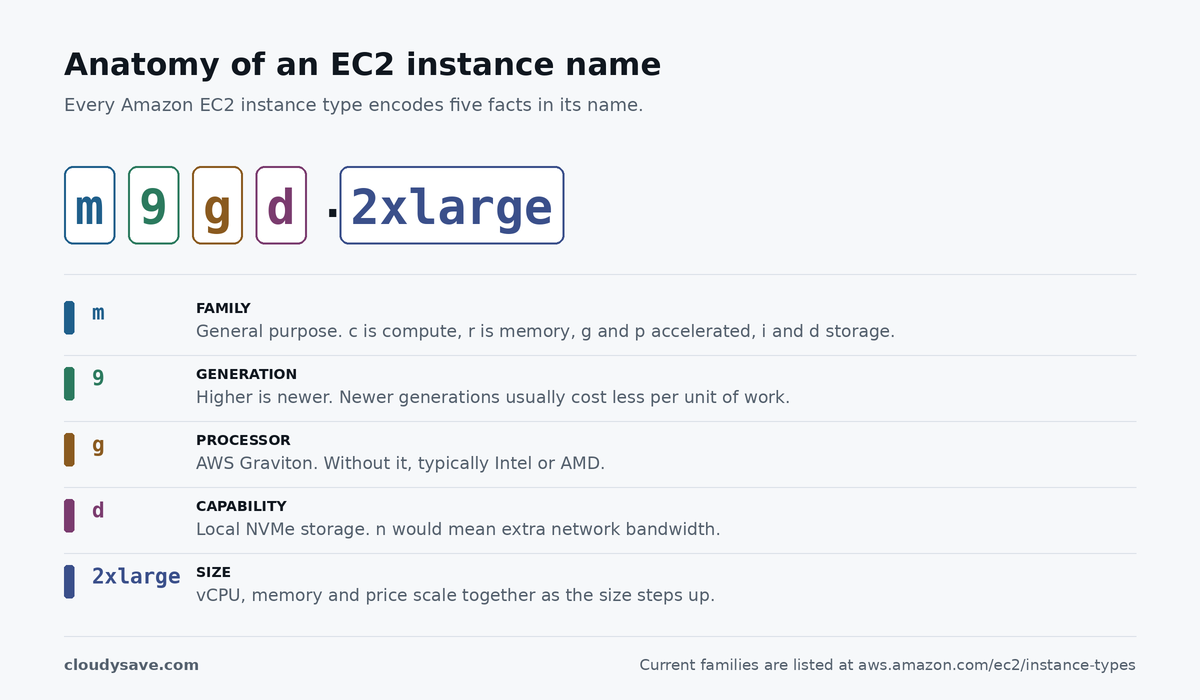
Every instance name follows the same pattern, and once you can parse it the catalogue stops being intimidating. Take m9g.xlarge:
- m — the family.
mis general purpose,ccompute optimised,rmemory optimised,gandpaccelerated computing,ianddstorage optimised,hpchigh performance computing. - 9 — the generation. Higher is newer, and newer generations generally deliver better price-performance than the one they replace.
- g — the processor.
gindicates AWS Graviton; instances without it typically run Intel or AMD silicon. - d, when present — a capability suffix.
dmeans local NVMe storage,nmeans additional network bandwidth. - xlarge — the size. Sizes scale roughly linearly in vCPU, memory and price, so
2xlargeis about twice the resources ofxlarge.
That means m9gd.2xlarge reads as: general purpose, ninth generation, Graviton, with local NVMe, at the 2xlarge size. You can decode a family you have never seen before without looking anything up.
The six AWS EC2 instance types families
General purpose
A balanced ratio of compute, memory and networking. The right default when you do not yet know which resource your workload leans on — web servers, small databases, development environments, microservices. The m families sit here, alongside the burstable t families.
Burstable instances work differently and deserve care. They run at a baseline CPU level and accrue credits while below it, then spend those credits to burst above baseline. That suits spiky, mostly-idle workloads and punishes sustained load, because once credits are exhausted performance drops back to baseline or you start paying for surplus credits.
Compute optimised
A higher ratio of vCPU to memory, on processors chosen for sustained compute throughput. Batch processing, high-traffic web front ends, media transcoding, scientific modelling, dedicated game servers. The c families.
Memory optimised
Large amounts of RAM per vCPU, for workloads whose working set has to stay in memory. In-memory caches, high-performance relational databases, real-time analytics over big datasets. The r, x and z families.
Accelerated computing
Instances with hardware accelerators — GPUs, or purpose-built silicon such as AWS Trainium and Inferentia — that perform certain calculations far faster than a general CPU. Machine learning training and inference, graphics rendering, computational fluid dynamics. The g and p families.
Storage optimised
Very high local disk throughput and IOPS, with storage physically attached to the host rather than reached over the network as EBS volumes are. NoSQL databases, data warehouses, distributed file systems, search. Some use NVMe SSDs for low latency, others dense HDDs for sequential throughput per terabyte.
The important caveat: local instance storage is ephemeral. Stop or terminate the instance and the data is gone. It is for scratch space, caches and replicated data, never for the only copy of anything.
HPC optimised
The newest category, built for tightly coupled high performance computing that runs across many nodes at once and is limited by inter-node communication. Weather modelling, crash simulation, computational chemistry. The hpc families.
AWS maintains the authoritative list of current families and their specifications on the EC2 instance types page, and marks superseded families under previous generation instances. Check there rather than trusting any third-party list, this one included — the catalogue changes several times a year.
Choosing between AWS EC2 instance types without guessing
Picking an instance is a process of elimination, in this order:
- Identify the constraining resource. Is the workload waiting on CPU, memory, disk or network? That answers the family question on its own, and it is the one step people skip.
- Take the newest generation available in your region. Newer generations usually cost less per unit of work than the ones they replace, so staying on an old generation is a quiet, recurring overpayment.
- Consider Graviton. AWS’s own processors generally offer better price-performance for workloads that can run on ARM, which covers most modern language runtimes. The migration cost is real but usually one-off.
- Size from measurements, not estimates. Start conservatively, then right-size against actual CPU and memory utilisation. Oversizing at launch is the most common source of avoidable EC2 spend, because nothing about an over-provisioned instance ever alerts you.
Sizing and purchasing are separate decisions, and both affect the bill. Once the type is settled, how you buy the capacity determines what you actually pay — On-Demand, Savings Plans, or Spot for interruption-tolerant work. Our guide to the factors that affect EC2 pricing covers how those interact, and the AWS Pricing Calculator will model a specific configuration against current published rates.
Matching AWS EC2 instance types to real workloads
The families describe hardware shapes, not applications, so the mapping from “what I am running” to “which family” is worth making explicit. A few common cases:
- A production web application. General purpose, fixed performance rather than burstable, sized from observed traffic and fronted by Auto Scaling for peaks.
- A relational database. Memory optimised almost always, because query performance collapses once the working set stops fitting in RAM and no amount of extra CPU recovers it.
- A CI build fleet. Compute optimised, on Spot capacity. Builds are interruption-tolerant by nature, which is exactly the workload Spot exists for.
- Machine learning inference. Accelerated computing, but check whether the model actually saturates a GPU before paying for one. Plenty of inference workloads run more cheaply on CPU.
- A log or analytics store. Storage optimised, with the caveat that local disk is ephemeral and the durable copy belongs somewhere else.
Two of these decisions are frequently made backwards. Databases get put on general purpose instances because they were already there, and GPU instances get provisioned for inference workloads that never needed them. Both are expensive and both are invisible on the bill until someone goes looking, because nothing in AWS flags a badly-matched instance type.
Common mistakes when picking AWS EC2 instance types
- Staying on an old generation out of inertia. A workload that has run on the same family for four years is almost certainly overpaying for the throughput it gets.
- Using burstable instances for steady load. Credits run out, performance drops, and the incident looks like an application fault rather than an instance choice.
- Sizing for peak instead of scaling to it. Auto Scaling exists precisely so you do not have to run peak capacity around the clock.
- Treating local NVMe as durable. It is not, and the lesson is usually expensive.
- Choosing the family from the name. “Compute optimised” sounds like the fast one. It is only fast for the workloads it is shaped for.